









Best Gaming Chairs With Real Lumbar Support (Not Just a Pillow)
You've probably been there: three hours into a session, your lower back starts aching, you reach behind you and adjust that little lumbar pillow for the fifth time, and within ten minutes it's migrated somewhere completely useless again. It's one of the most frustrating experiences in gaming seating — and the sad truth is that a lot of chairs are sold with the pillow as the lumbar support, full stop.
Real lumbar support isn't a cushion strapped to a backrest. It's an engineered system built into the chair's structure, designed to maintain consistent contact with your lumbar spine regardless of how you shift, lean, or settle in over a long session. The difference between a pillow and a proper lumbar mechanism is the difference between duct-taping a knee brace to your leg and actually wearing one correctly. One gives you the feeling of doing something; the other actually works.
In this guide, we break down exactly what makes lumbar support real, the different types of built-in systems you'll encounter in premium gaming chairs, and which Blacklyte gaming chairs are engineered with genuine lumbar mechanisms — not an afterthought pillow. Whether you're building your first serious setup or upgrading from a chair that's been quietly destroying your posture, this is the breakdown you need.
Why a Lumbar Pillow Isn't Enough
To understand the problem, you need to understand what the lumbar region is actually doing when you sit. Your lower spine (roughly L1 through L5) maintains a natural inward curve called the lordotic curve. When you sit without support, gravity and muscle fatigue cause this curve to flatten or reverse — your pelvis tilts backward, your lower back rounds out, and the pressure on your intervertebral discs increases significantly. Over hours, that accumulated load causes the familiar deep ache that gamers know all too well.
A lumbar pillow addresses this by placing a padded object in the gap between your lower back and the chair. On paper, that sounds correct. In practice, a pillow has no structural attachment to your spine's position — it just sits there. The moment you shift forward to grab your keyboard, lean sideways, or adjust your recline, the pillow either stays behind or slides out of position entirely. You end up manually repositioning it constantly, which is exactly what proper lumbar support is supposed to eliminate.
Built-in lumbar systems solve this by integrating support directly into the backrest structure. The support moves with the chair's geometry. When properly adjusted, it maintains contact with your lumbar spine throughout natural sitting movement, providing continuous, passive support rather than intermittent, position-dependent contact. That's the core engineering difference — and it's why serious ergonomic design prioritizes built-in systems over external pillows.
Types of Built-In Lumbar Support Explained
Not all built-in lumbar systems are created equal, and the marketing language can make them sound interchangeable when they're functionally very different. Here's a clear breakdown of the main types you'll encounter when shopping for a serious gaming chair.
Fixed Raised Lumbar
Some chairs shape the lower backrest to protrude slightly and follow the natural lordotic curve — no adjustability, just a contoured form. This is better than a pillow because it's structurally integrated, but it only works well if the chair's lumbar protrusion happens to match your spine's position and depth. Taller or shorter users often find fixed lumbar systems miss their target zone entirely.
Height-Adjustable Lumbar
This system allows you to slide the lumbar support up or down within the backrest, so you can position it to align precisely with your L3–L5 vertebrae regardless of your torso length. It's a meaningful upgrade over fixed designs because it accounts for the fact that lumbar positioning isn't one-size-fits-all. Many mid-range to premium chairs include this feature.
Depth-Adjustable Lumbar
Depth adjustment controls how far the lumbar support pushes forward into your lower back. This matters because people have different magnitudes of lordotic curve — someone with a more pronounced curve needs more projection, while someone with a flatter lower back needs less. Without depth control, you risk either under-supporting or over-correcting the lumbar region, both of which cause discomfort in different ways.
4-Way Adjustable Lumbar (Height + Depth)
This is the gold standard for built-in lumbar in gaming chairs: independent control over both vertical position and forward projection. Combined, these two axes let you dial in support that precisely matches your spine's geometry, your preferred sitting posture, and even changes depending on whether you're in an upright gaming position or a more reclined work-from-home posture. At the flagship tier, this is what you should expect.
Floating Lumbar With Depth Fine-Adjust
A floating lumbar sits within the backrest structure but moves slightly in response to your body's natural micro-movements rather than being fully rigid. A front-to-back fine-adjust with a locking mechanism lets you set the depth you need, while the floating behavior adapts passively to subtle postural shifts. This approach prioritizes responsiveness and continuous contact over fixed-point support.
What to Look For in a Gaming Chair With Real Lumbar Support
When comparing chairs, the lumbar system is obviously the headline spec — but it's one part of a broader ergonomic picture. Here are the criteria that matter most for long-session comfort and back health:
- Built-in lumbar mechanism: Confirm whether the lumbar is integrated into the backrest structure or a separate pillow. A built-in system should be listed as a chair specification, not an included accessory.
- Adjustability axes: At minimum, look for depth (front-to-back) adjustment. Height adjustment is a meaningful bonus. Both together is the optimal setup.
- Seat foam density: A chair's foam affects how your pelvis sits, which directly influences lumbar alignment. High-density cold-cure foam keeps your hips level and reduces the pressure that causes lower back strain.
- Armrest adjustability: 4D armrests across the full lineup let you position your arms to eliminate shoulder tension, which cascades into better upper back posture and less compensatory lumbar strain.
- Recline range: A chair that reclines to approximately 149° gives you posture variety across a long session — a key factor in preventing lumbar fatigue even with good support.
- Backrest height: A taller backrest provides full spinal support from the lumbar region up through the thoracic spine and into the neck, which means less compensatory tension pulling on your lower back.
- Tilt mechanism quality: Look for a frog-type tilt mechanism with adjustable tension — this allows comfortable natural rocking that reduces static load on the lumbar discs during long sessions.
It's also worth checking the base material and gas piston class. A Class 4 hydraulic gas piston provides smooth, reliable height adjustment that holds position under load, keeping you at the right desk height and maintaining the hip-to-knee angle that takes pressure off the lumbar spine. These details separate chairs built for long-term ergonomic performance from chairs built to look good in a product photo. You can use the Blacklyte chair comparison tool to evaluate specific specs side by side.
Best Blacklyte Gaming Chairs With Built-In Lumbar Support
Blacklyte's current lineup spans three chair series, each with a different lumbar approach that reflects their position in the product hierarchy. Here's an honest breakdown of what each one offers and who it's best suited for.
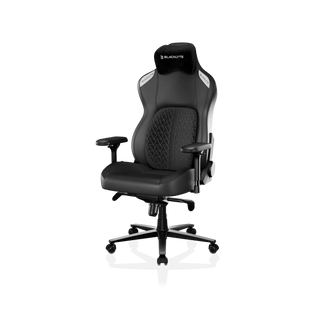
Kraken Pro – Built-In Floating Lumbar With Depth Lock
The Kraken Pro sits at Blacklyte's premium tier — a serious ergonomic chair with a genuine built-in lumbar mechanism. Its floating lumbar system sits within the backrest structure and offers front-to-back depth fine-adjustment with a locking function, so you can set the projection point that matches your lumbar curve and lock it in place. It doesn't have the vertical height adjustment axis that the Athena Pro offers, but the floating nature of the mechanism provides a degree of passive adaptability that a fixed lumbar can't match.
The Kraken Pro uses contour foam in both the seat and backrest, with DuraGen™ Leatherette upholstery — an engineered composite designed for durability and easy maintenance. The aluminum alloy base and Class 4 hydraulic gas piston carry over from the premium build standard, and 4D armrests are included across the full lineup. For gamers who want a built-in lumbar system with premium build quality, the Kraken Pro delivers real structural support rather than a pillow workaround.
Key specs at a glance:
- Lumbar: Built-in floating lumbar with depth fine-adjust and lock
- Seat foam: Contour foam
- Armrests: 4D
- Recline: 90°–149°
- Base: Aluminum alloy
- Gas piston: Class 4 hydraulic
- Tilt: Frog-type with adjustable tension
- Upholstery: DuraGen™ Leatherette
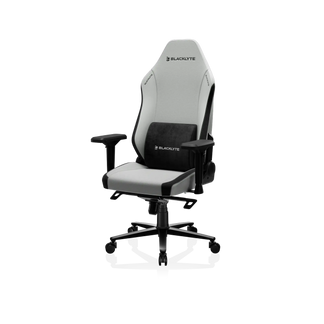
Athena Pro – Flagship 4-Way Adjustable Lumbar
The Athena Pro is Blacklyte's flagship chair, and its lumbar system reflects that. The built-in 4-way adjustable lumbar supports independent height (up/down) and depth (front/back) adjustment, giving you the full range of control to dial in support for your specific spine geometry and sitting posture. There's no pillow to misplace, no external attachment to fidget with — just a structural lumbar that stays exactly where you set it.
The seat itself uses a memory foam over contour-foam core construction, infused with bamboo charcoal and silver ions for breathability and hygiene over long sessions. The high-density foam keeps your pelvis properly supported, which is the foundation that makes any lumbar system actually work — if your hips sink into a soft seat, no lumbar system can fully compensate. The Athena Pro's aluminum alloy base and Class 4 hydraulic gas piston deliver the structural stability that premium ergonomics require, and the DuraGen™ Leatherette upholstery is built to maintain its form under the sustained pressure of daily use.
For gamers who spend four or more hours in a chair regularly and want a lumbar system they set once and forget, the Athena Pro is the correct choice in the Blacklyte lineup.
Key specs at a glance:
- Lumbar: Built-in 4-way adjustable (height + depth)
- Seat foam: Memory foam over contour-foam core, bamboo charcoal and silver ion infused
- Armrests: 4D
- Recline: 90°–149°
- Base: Aluminum alloy
- Gas piston: Class 4 hydraulic
- Tilt: Frog-type with adjustable tension
- Upholstery: DuraGen™ Leatherette, FlexKnit™ Fabric
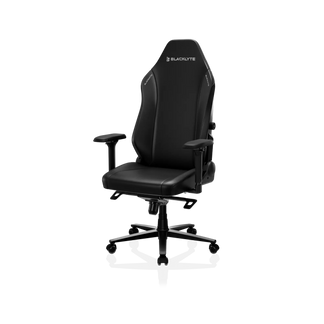
Athena – Entry Point With External Lumbar Pillow
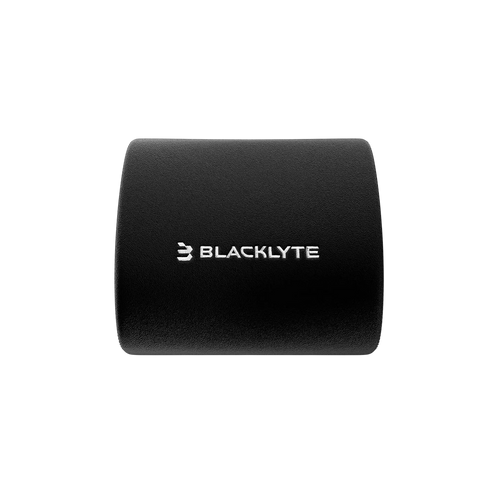
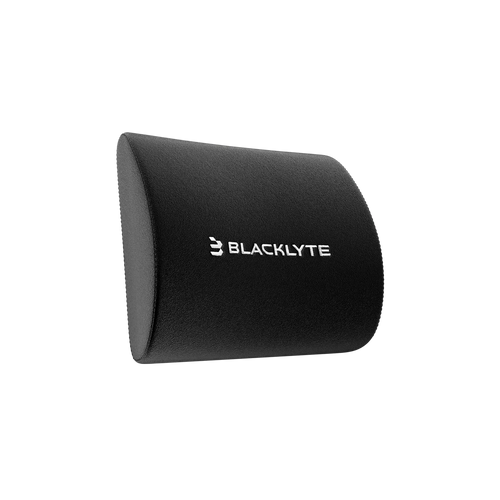
The Athena is Blacklyte's entry-level chair, and unlike the Athena Pro and Kraken Pro, its lumbar solution is an external pillow rather than a built-in mechanism. In the context of this guide, that's an honest limitation worth naming directly: if your primary concern is consistent, hands-free lumbar support that holds position across a long session, the Athena's pillow system requires more active management than the built-in solutions above.
That said, the Athena's pillow is a quality component — and for users who are new to ergonomic seating, it provides a meaningful improvement over chairs with no lumbar consideration at all. The Aluminum alloy base, Class 4 hydraulic gas piston, contour foam seat, 4D armrests, and 90°–149° recline range all deliver solid ergonomic fundamentals. If you're starting your ergonomic journey and plan to upgrade the lumbar experience over time, the Athena is a capable foundation — just be aware of what you're getting in the lumbar department specifically.
Key specs at a glance:
- Lumbar: External lumbar pillow
- Seat foam: Contour foam
- Armrests: 4D
- Recline: 90°–149°
- Base: Aluminum alloy
- Gas piston: Class 4 hydraulic
- Tilt: Frog-type with adjustable tension
Want to compare all three chairs side by side across every spec? Use the Blacklyte chair comparison page to see the full breakdown, or browse the complete gaming chair collection.
Lumbar Support Works Best With Good Habits
Even the best built-in lumbar system in the world doesn't compensate for fundamentally poor sitting habits. A 4-way adjustable lumbar set to the wrong depth, combined with slouching and a monitor at the wrong height, will still produce back pain. The chair is the enabler — your posture habits are what actually determine the outcome. This is worth keeping in mind as you evaluate your setup holistically rather than treating the chair as the single fix.
A few habits that maximize the benefit of good lumbar support: sit with your hips pushed back fully into the seat so the lumbar mechanism makes contact with your lower back rather than your mid-back. Keep your feet flat on the floor with knees at approximately 90°. Position your monitor at eye level so you're not dropping your chin or craning your neck, which creates compensatory tension that travels down the spine. And take movement breaks — even a two-minute walk every 45–60 minutes dramatically reduces the cumulative disc load that causes the deep ache gamers associate with long sessions.
For a deeper dive into optimal sitting posture and workstation ergonomics, Blacklyte's ergonomics resource hub covers desk height, monitor positioning, and seated posture in detail. If you're focused specifically on the gaming side, the Gaming Hub addresses performance ergonomics for competitive play.
The Bottom Line
If lower back pain is a regular part of your gaming experience, a detachable lumbar pillow is a band-aid, not a solution. Real lumbar support is built into the chair's structure, adjustable to match your spine's specific geometry, and maintains consistent contact without requiring you to constantly reposition it. The difference is immediately noticeable — and over hundreds of hours of use, it's the difference between a chair that gradually damages your posture and one that actively supports it.
Within the Blacklyte lineup, the Kraken Pro delivers a genuine built-in floating lumbar with depth adjustment and lock at the premium tier — a real mechanism, not a pillow. The Athena Pro offers the most comprehensive lumbar solution with its 4-way adjustable built-in system (height and depth), making it the right choice for serious long-session use. The Athena provides a strong ergonomic foundation at the entry level, with an external lumbar pillow that's best understood as a starting point rather than a permanent solution.
All three chairs are backed by Blacklyte's warranty (extendable up to 5 years), free shipping, and 30-day easy returns — so there's no risk in finding the right fit for your back. Over 200,000 gamers across 50+ Countries & Regions have already made the switch. Your lumbar spine will thank you for joining them.
Ready to Upgrade to Real Lumbar Support?
Browse the full Blacklyte gaming chair lineup and find the built-in lumbar system that matches your body, your budget, and your sessions. Not sure which chair is right for you? Our team is here to help.


