









Best Gaming Chair for FPS Gaming: Features That Support Better Aim, Posture, and Reaction Time

A good gaming chair for FPS gaming will not magically improve your headshot percentage. What it can do is give you a stable, repeatable position so discomfort, slouching, and shoulder tension are less likely to interrupt the mechanics you have already practiced.
For a PC gamer, reducing fatigue matters during long gaming sessions. When your lower back begins to ache or your mouse-side shoulder rises, your sitting position changes. Your aim may start to feel less natural, not because the chair controls reaction time, but because your body is no longer working from the same base.
The best gaming chairs for FPS players should prioritize stability, proper lumbar support, adjustable arms, supportive cushioning, suitable seat width, and an upright position that feels comfortable for long hours.
What Makes a Gaming Chair Suitable for FPS Gaming?
The best chair is not always the one with the most dramatic design or the longest list of fancy features. FPS players usually benefit more from predictable support than from plush comfort alone.
A suitable ergonomic gaming chair should provide:
- A stable frame and wheelbase
- Adjustable lumbar support
- Adjustable armrest height and position
- A supportive, relatively open seat base
- Multiple recline positions
- Neck support that does not push the head forward
- Enough seat width for different body shapes
- Breathable fabric upholstery or durable leatherette versions
These ergonomic features help create a more consistent gaming setup. They also make the chair easier to adjust for different sitting positions rather than forcing the body into one rigid pose.
OSHA notes that a properly adjusted chair should support the back, legs, and arms while reducing awkward postures. It also recommends a backrest that follows the spine’s natural curve and armrests that allow the shoulders to relax.
Stability Creates a Better Base for Mouse Control
Fast flicks and wide tracking movements can make an unstable chair shift beneath you. Most gaming chairs look sturdy in photos, but build quality becomes easier to judge when you lean forward, reposition your feet, or move quickly across a large mousepad.
When testing gaming chairs, check whether the chair rocks unexpectedly, whether the armrests wobble, and whether the base feels secure. A full steel frame and a strong wheelbase can give the upper body a more reliable platform.
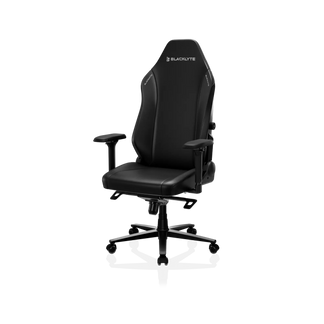
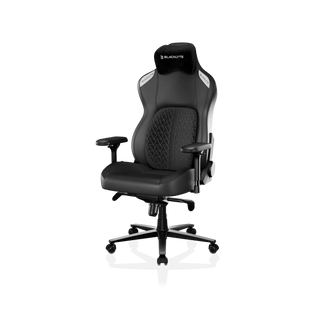
The Blacklyte Athena Pro uses a full steel frame, a 700 mm aluminum-alloy wheelbase, a Class 4 gas lift, and a 90°–149° reclining range. The Blacklyte Kraken Pro also uses a full steel frame and is positioned for competitive players, streamers, and professionals who value stability and full-body support.
Explore the current Blacklyte gaming chair collection to compare its main seating options.
Lumbar Support Helps You Hold a Consistent Position
Lumbar support is one of the most important differences between a basic budget gaming chair and a premium gaming chair.
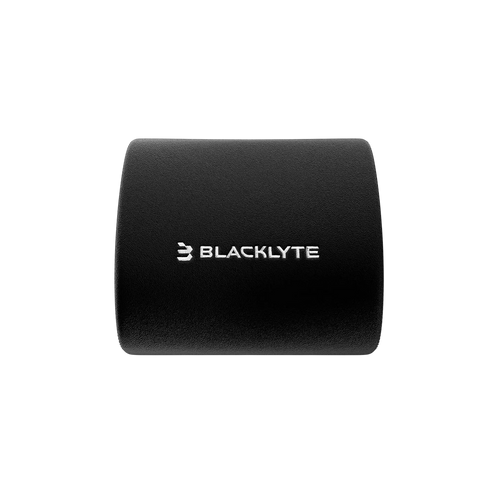
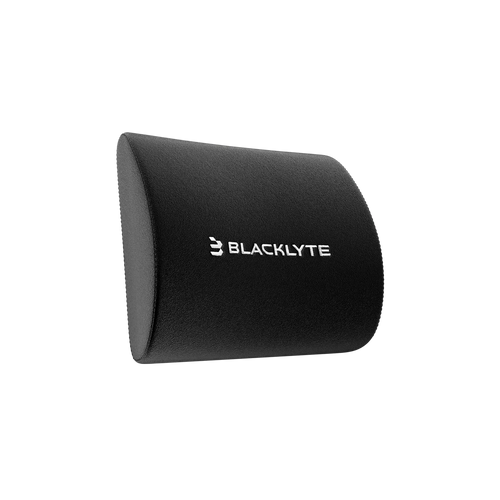
Many gaming chairs use a loose pillow that moves as the user changes sitting positions. Other gaming chairs provide built-in lumbar support or integrated lumbar support that can be adjusted without repeatedly moving a cushion by hand.
Good lumbar support should meet the curve of the lower spine without pushing the player too far forward. Dynamic lumbar support can also maintain contact as the body shifts. This type of posture support may make it easier to avoid slouching during a close match.
The Blacklyte Athena Pro includes 4-way built-in adjustable lumbar support with height and depth adjustment. Its backrest also uses memory foam for additional support.
The Blacklyte Kraken Pro uses an adaptive Dynamic Air Lumbar Support System. According to Blacklyte, the system floats and locks into position, maintaining back support as the user shifts weight.
Players who want to understand the difference between a movable pillow and proper lumbar support can read Blacklyte’s guide to gaming chairs with built-in lumbar support.
Adjustable Arms Can Improve Mouse-Side Comfort
Great armrests should support the forearms without lifting the shoulders or restricting movement. The correct armrest height depends on desk height, mouse sensitivity, arm length, and aiming style.
Low-sensitivity players may prefer adjustable arms positioned slightly lower or farther back, allowing the desk to support more of the forearm. Players using smaller wrist movements may want the armrest closer to the desk surface.
The Athena Pro has 4D adjustable armrests that move in several directions. These adjustable features help users find a position that supports their natural posture instead of forcing both arms into the same fixed position.
Even the most comfortable gaming chairs can feel wrong when the armrests do not align with the desk. Adjust the chair, armrests, keyboard, mouse, and monitor as one connected gaming setup.
Seat Width and Cushioning Matter After Several Hours
A chair can feel extremely comfortable for five minutes and become tiring after three hours. This is why testing gaming chairs should include more than checking initial softness.
A supportive seat base should distribute pressure without allowing the hips to sink too deeply. High-density foam generally provides a firmer, more consistent foundation than an overly soft cushion. The Athena Pro combines a dual-layer memory-foam top with a high-density core, while the Kraken Pro uses high-density memory foam with medium-firm support.
Seat width is equally important. A narrow seat may restrict the thighs, while an unnecessarily large XL model may place the armrests too far apart. Compare your body measurements with the product dimensions rather than assuming a larger frame is always better.
Cooling foam sounds pretty cool, but material labels should not replace practical judgment. Whatever a company calls its cushion, focus on firmness, shape retention, breathability, and how it feels after long hours. Fabric upholstery can reduce the sticky feeling associated with heat buildup, while leatherette versions are often easier to clean.
Gaming Chair, Office Chair, or Ergonomic Chair?
A good office chair, task chair, or one of the better mesh chairs can also work for gaming. However, regular gaming chairs often provide a higher backrest, deeper recline positions, neck support, and more setup-focused styling.
Some office seating uses a synchronous tilt mechanism, allowing the seat and backrest to move together. Synchronous tilt can be comfortable for general work, but an FPS player may place greater value on a secure upright position during competitive play.
The best ergonomic gaming chair combines the posture support of an ergonomic chair with the stability and adjustable features expected from a gaming chair. It should not rely on appearance alone.
How to Adjust Your Gaming Chair for FPS Play
Set the chair height so both feet rest firmly on the floor. Keep the knees near a right angle and avoid spending an entire match with one leg folded beneath you.
Adjust the lumbar support until it gently fills the lower-back curve. Set the adjustable arms so your shoulders stay relaxed, then bring the desk and monitor into alignment. Your head should remain balanced rather than reaching toward the screen.
Remember to change sitting positions and take short movement breaks. No comfortable chair removes the need to move, and even the best gaming setup cannot make uninterrupted sitting harmless.
Which Blacklyte Chair Fits an FPS Setup?
The Athena Pro is a great gaming chair for players who want all the adjustable features in a balanced design. Its built-in lumbar support, 4D armrests, dual-layer foam, steel frame, and reclining backrest make it suitable for gaming, streaming, and office work.
The Kraken Pro is a dynamic ergonomic chair for players who want adaptive lumbar support, a larger-frame feel, medium-firm cushioning, and strong posture support during long hours.
A first chair upgrade does not need every premium feature. A budget gaming chair at around half the price of a high-end gaming chair may still be suitable when it fits correctly and provides good lumbar support. However, the best budget gaming chair should not sacrifice frame stability, seat fit, or basic adjustment.
Use the Blacklyte gaming chair buying guide to compare fit, materials, build quality, and ergonomic features before choosing.
Final Takeaway
The best gaming chair for FPS gaming gives you a stable foundation, reliable back support, adjustable arms, sufficient seat width, and enough flexibility to change posture between matches.
It cannot create better aim or faster reaction time on its own. Practice still determines performance. A comfortable gaming chair simply helps discomfort and instability stay out of the way, making it easier to preserve better posture and consistent mechanics throughout a demanding session.


